















Content

Direct Answer and Ownership
The transition from a hotel construction or renovation project to daily culinary operations involves a structured transfer of information. A hotel kitchen equipment asset register serves as the definitive record of installed hardware, bridging the gap between procurement activities and ongoing facility management. This handover register is not a purchasing ledger; rather, it is an operational tool designed to capture model and serial records, consolidate manuals and warranty contacts, establish maintenance schedules, and organize spare-parts references.
Establishing clear ownership of this data is the first step in the handover process. During the project phase, procurement teams and project managers hold the primary responsibility for sourcing and delivering the equipment. However, once the equipment is installed and commissioned, ownership of the asset data transfers to the operational teams—specifically the executive culinary team and the property engineering or facilities department. To successfully document equipment received after approval, the project team provides a comprehensive, verified register that operations can maintain independently after the project handover is complete.
Without a formal handover register, operations teams may be left to manage complex commercial kitchens relying on fragmented delivery dockets or incomplete supplier invoices. This can contribute to delayed warranty claims, maintenance challenges, and extended equipment downtime when spare parts cannot be quickly identified. The asset register establishes a clear custodian for each piece of equipment, ensuring that the physical asset is matched with its corresponding documentation, service history, and support network.
Asset Register Field Set
The foundation of the handover process is the asset register itself. This database is structured to capture identifying information for every piece of commercial kitchen equipment. The fields included in this register are standardized across all suppliers and manufacturers to support consistency and usability for the operations team.
According to guidelines from the Yale Office of Facilities, as-installed handover records can include the equipment number, manufacturer, part number, serial number, model, location, vendor contact, warranty end date, and drawing or submittal references. These fields define the identity of the asset and provide the necessary context for future service interventions. Similarly, the University System of New Hampshire notes that equipment inventory records identify assets by tag, description, model, manufacturer, serial number, and location, while custodians record warranty and maintenance actions.
The following decision tool outlines the required fields for a comprehensive hotel kitchen equipment asset register. Procurement and project teams populate the initial data, while operations teams verify the buyer-entered values during the physical handover. The accuracy of these fields is critical, as a single transposed digit in a serial number can complicate future service requests. The register acts as the central repository, replacing scattered emails and physical delivery receipts with a single, unified document.
Decision Tool: asset_register_matrix
| Field Name | Description and Purpose | Source Document | Buyer-Entered Value (Example/Action) |
|---|---|---|---|
| Asset Tag / Equipment Number | A unique alphanumeric identifier assigned by the property to track the specific unit. | Property Asset Management System | [Enter unique property asset tag, e.g., KITCH-OVEN-001] |
| Equipment Description | A clear, common-language description of the asset (e.g., Double Deck Convection Oven). | Procurement Purchase Order | [Enter standard equipment description] |
| Manufacturer | The original equipment manufacturer (OEM) that produced the unit. | Physical Nameplate / Submittal | [Enter OEM name] |
| Model Number | The specific model designation assigned by the manufacturer. | Physical Nameplate | [Enter exact model number from nameplate] |
| Serial Number | The unique production number assigned by the manufacturer, critical for warranty claims. | Physical Nameplate | [Enter exact serial number from nameplate] |
| Physical Location | The specific kitchen outlet and zone where the equipment is installed. | Floor Plan / Installation Drawing | [Enter location, e.g., Banquet Kitchen - Hot Line] |
| Assigned Custodian | The operational department or specific role responsible for the daily care of the asset. | Operations Organizational Chart | [Enter custodian, e.g., Executive Banquet Chef] |
| Vendor / Supplier Contact | The company that sold and delivered the equipment, often the first point of contact for issues. | Supplier Invoice / Contract | [Enter supplier name, phone, and email] |
| Warranty End Date | The exact date the manufacturer or supplier warranty expires. | Warranty Certificate / Contract | [Enter verified warranty expiration date] |
| Drawing / Submittal Reference | The specific project drawing or submittal document where the equipment specifications are detailed. | Project Documentation Archive | [Enter drawing number or submittal ID] |
Exact supplier and manufacturer records are required to populate the Manufacturer, Model Number, Serial Number, and Warranty End Date fields. Human approval from the operations team is necessary to confirm that the Physical Location and Assigned Custodian fields accurately reflect the reality of the working kitchen.
Nameplate Capture Workflow
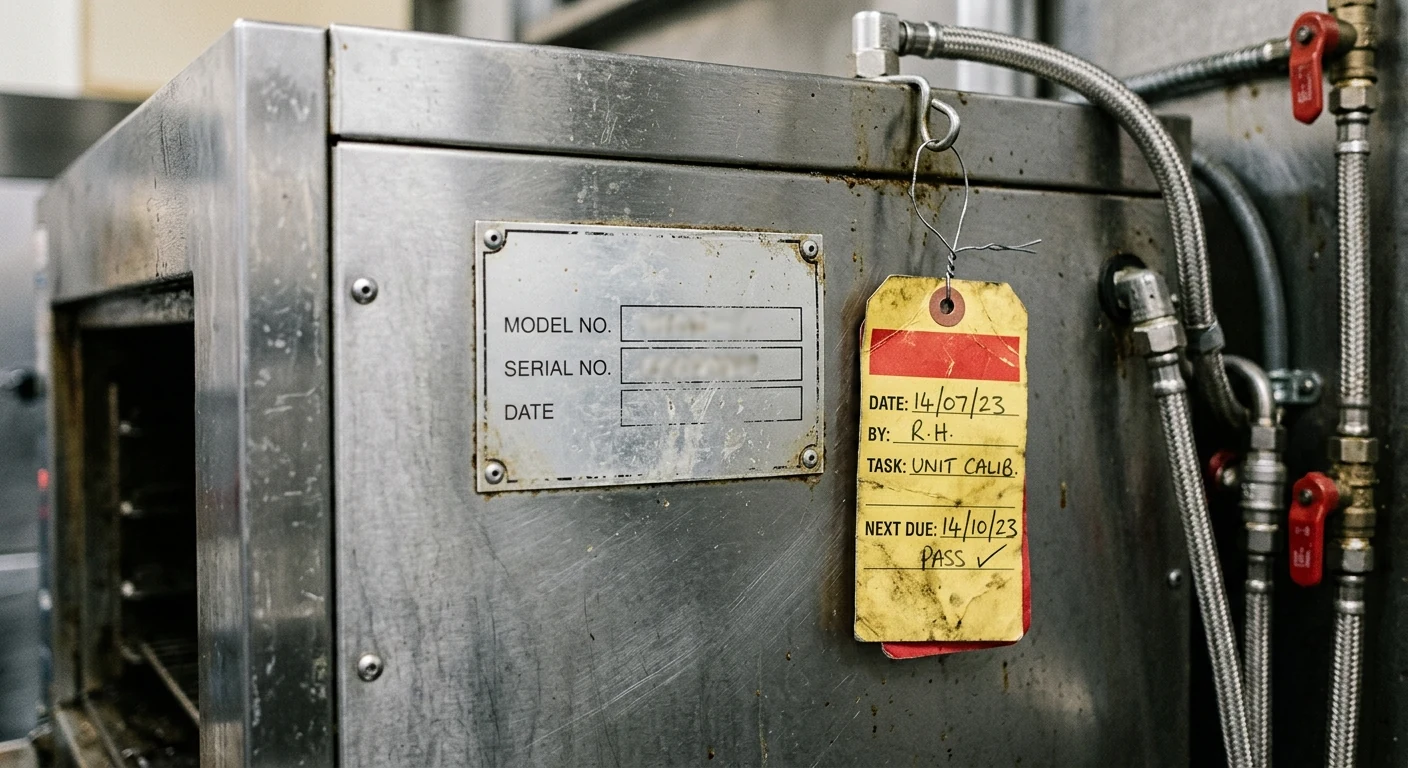
While procurement documents provide a baseline of expected equipment, the asset register must reflect the physical reality of what was actually installed. Purchase orders often list generic model families or lack serial numbers entirely, as serial numbers are typically assigned at the time of manufacturing or dispatch. Therefore, a physical nameplate capture workflow is a component of the handover process.
The University of Illinois Business and Finance guidelines indicate that routine record updates can include location, custodian, condition, manufacturer, model, and serial number. In a hotel kitchen environment, capturing this data requires a systematic physical audit of every installed unit before the kitchen becomes fully operational.
First, the handover team generates a draft asset register based on procurement records, leaving the serial number and exact model number fields blank or marked for verification. Next, a joint team comprising a procurement representative and an operations representative walks through the kitchen outlets. The team locates the manufacturer's data plate on each piece of equipment, which is typically affixed to the side, rear, or inside the door panel of the unit. The team reads and records the exact model number and serial number directly from the physical plate.
Following this, the team takes a clear, legible photograph of the nameplate. This photograph serves as a record in case the physical plate is later damaged, obscured by grease, or removed during deep cleaning. Finally, the captured data is entered into the asset register and cross-referenced against the procurement documents to verify the correct equipment was delivered. Human approval is explicitly required during the reconciliation step to confirm that the physical nameplate data matches the expected deliverables. Any discrepancies between the ordered model and the installed model are flagged for review.

Manual and Warranty Handover
Commercial kitchen equipment requires specific operational knowledge and adherence to manufacturer guidelines. The handover process includes the systematic transfer of all Operation and Maintenance (O&M) manuals, user guides, and warranty certificates from the project team to the operations team.
It is important to separate this heavy equipment documentation from general supplies. A hotel OS&E procurement guide will handle the receipt of smallwares, glassware, and loose utensils, but the asset register focuses strictly on capitalized equipment that requires technical manuals and warranty tracking. According to the Stanford Property Management Office, property records should remain current and can include attachments and photos, which in this context means linking digital copies of manuals and warranty documents directly to the asset record.
The project team collects these documents from the suppliers, organizes them by equipment type and location, and presents them to the operations team in both physical and digital formats. The following decision tool provides a checklist for managing this document handover. Exact supplier records are required to provide the authorized service agent list and the formal warranty certificates. The operations team provides human approval to confirm that the documents received are legible, complete, and correspond to the specific models installed in the kitchen. This step ensures that the culinary staff has access to the correct operating procedures before they turn on the equipment for the first time.
Decision Tool: document_handover_checklist
| Document Type | Required Format | Supplier Provided (Y/N) | Operations Accepted (Y/N) | Buyer-Entered Notes / File Location |
|---|---|---|---|---|
| Installation Manual | Digital (PDF) | [Enter Y/N] | [Enter Y/N] | [Enter server path or cloud link] |
| User / Operator Manual | Physical (Binder) & Digital | [Enter Y/N] | [Enter Y/N] | [Enter physical binder location and digital link] |
| Service / Parts Manual | Digital (PDF) | [Enter Y/N] | [Enter Y/N] | [Enter server path or cloud link] |
| Warranty Certificate | Physical (Original) & Digital | [Enter Y/N] | [Enter Y/N] | [Enter physical file location and digital link] |
| Authorized Service Agent List | Digital (PDF or Spreadsheet) | [Enter Y/N] | [Enter Y/N] | [Enter primary service contact details] |
Maintenance Schedule and Service History
Once the equipment is handed over, the responsibility for keeping it in working order falls to the operations and engineering teams. A function of the asset register is to establish the baseline for future maintenance schedules and provide a framework for recording service history.
The University of Washington Equipment Inventory Office states that detailed maintenance records can capture the service date, details, deficiencies, inspection results, actions, and supporting documents. By integrating these fields into the handover register, the hotel ensures that preventive maintenance scheduling begins immediately.
The maintenance schedule follows the applicable manufacturer manual and warranty terms. Exact requirements require supplier/manufacturer records. The engineering team extracts the recommended service intervals—such as monthly filter changes, quarterly calibration, or annual deep cleaning—and assigns them to specific dates and responsible parties.
Decision Tool: maintenance_schedule
| Equipment Tag | Maintenance Task Description | Frequency | Next Action Date | Service Provider / Internal Contact |
|---|---|---|---|---|
| [Enter Asset Tag, e.g., KITCH-FRY-002] | [Enter task, e.g., Calibrate thermostat and check high-limit switch] | [Enter frequency, e.g., Semi-Annually] | [Enter specific upcoming date] | [Enter internal engineer or external contractor name] |
| [Enter Asset Tag] | [Enter task, e.g., Inspect and clean condenser coils] | [Enter frequency, e.g., Quarterly] | [Enter specific upcoming date] | [Enter internal engineer or external contractor name] |
| [Enter Asset Tag] | [Enter task, e.g., Replace water filtration cartridges] | [Enter frequency, e.g., Every 6 Months] | [Enter specific upcoming date] | [Enter internal engineer or external contractor name] |
| [Enter Asset Tag] | [Enter task, e.g., Inspect door gaskets and hinges] | [Enter frequency, e.g., Monthly] | [Enter specific upcoming date] | [Enter internal engineer or external contractor name] |
| [Enter Asset Tag] | [Enter task, e.g., Descale boiler tank] | [Enter frequency, e.g., Annually] | [Enter specific upcoming date] | [Enter internal engineer or external contractor name] |
Human approval from the Chief Engineer or Facilities Manager is required to finalize the maintenance schedule, ensuring that the property has the necessary labor resources or external service contracts in place to execute the required tasks.
Spare-Parts Reference Control
Equipment downtime in a hotel kitchen presents operational challenges. When a component requires replacement, the operations team needs to identify the correct part and contact a supplier efficiently. The handover register includes a spare-parts reference control section that identifies high-wear and critical components for key equipment.
During the handover phase, the project team and the operations team review the service manuals to identify consumable parts, such as water filters, gaskets, or fryer baskets, alongside operational parts like specific heating elements, control boards, or specialized motors. The exact manufacturer part numbers are recorded in the register, along with the contact information for the authorized parts distributor.
This documentation allows the engineering team to establish a minimum stock level for inexpensive, high-turnover parts on-site, and supports the issuance of an accurate purchase order for larger components when needed. Using unverified part numbers may complicate repairs and interact with warranty terms; exact requirements require supplier/manufacturer records. By building this reference table before the kitchen opens, the hotel reduces the administrative burden on the engineering team during future service events.
Decision Tool: spares_reference_table
| Equipment Model | Part Description | Manufacturer Part Number | Supplier / Distributor Contact | Minimum On-Site Stock Level |
|---|---|---|---|---|
| [Enter exact model, e.g., XYZ-123 Combi] | [Enter part, e.g., Door Gasket] | [Enter exact OEM part number] | [Enter distributor name and phone] | [Enter required stock quantity, e.g., 2] |
| [Enter exact model] | [Enter part, e.g., Water Filter Cartridge] | [Enter exact OEM part number] | [Enter distributor name and phone] | [Enter required stock quantity] |
| [Enter exact model] | [Enter part, e.g., Heating Element 208V] | [Enter exact OEM part number] | [Enter distributor name and phone] | [Enter required stock quantity, e.g., 0 - Order as needed] |
| [Enter exact model] | [Enter part, e.g., Thermocouple] | [Enter exact OEM part number] | [Enter distributor name and phone] | [Enter required stock quantity] |
| [Enter exact model] | [Enter part, e.g., Blower Motor] | [Enter exact OEM part number] | [Enter distributor name and phone] | [Enter required stock quantity] |
Outlet-by-Outlet Handover Review
A large hotel typically features multiple distinct food and beverage outlets, each with its own specialized equipment and operational team. The handover process is organized to reflect this physical and organizational reality. Applying the register across the hotel kitchen outlet planning context ensures that the appropriate personnel take ownership of the specific equipment they will manage.
For example, the equipment in the main banquet production kitchen differs in scale and complexity from the equipment in a rooftop specialty restaurant or a lobby cafe. The asset register is segmented by these physical locations. During the handover review, the project team conducts separate walkthroughs for each outlet.
While the Executive Chef oversees all culinary operations, the daily custodian of the equipment in the pastry kitchen is the Executive Pastry Chef. By segmenting the handover review outlet-by-outlet, the project team ensures that the specific end-users are present to verify the equipment, receive the relevant manuals, and review the maintenance schedules for the tools they will use daily. This localized approach is intended to reduce information bottlenecks at the executive level and supports outlet managers in taking immediate ownership of their respective assets.
Exception and Missing-Document Queue
In a major hotel project, it is common for some pieces of equipment to be delivered with missing manuals, delayed warranty cards, or obscured nameplates. Waiting for absolute completion before initiating the handover can delay the kitchen opening and impact the operations team's training schedule.
To manage this reality, the handover process includes a formal mechanism for tracking deficiencies without halting the overall acceptance of the kitchen. This is achieved through an exception and missing-document queue. When the joint team conducts the physical audit and document review, any missing information—such as a supplier failing to provide the digital service manual, or a nameplate scratched during installation—is logged in the exception queue.
The queue assigns responsibility for resolving the issue to a specific party, usually the procurement agent or the supplier, and sets a target resolution date. This allows the operations team to accept the physical equipment and begin culinary training, while procurement continues to address the administrative requirements.
Decision Tool: exception_queue
| Asset Tag / Equipment | Missing Item / Deficiency Description | Responsible Party | Target Resolution Date | Current Status |
|---|---|---|---|---|
| [Enter Asset Tag] | [Enter deficiency, e.g., Missing digital service manual] | [Enter responsible party, e.g., Procurement Agent] | [Enter target date] | [Enter status, e.g., Open - Supplier Contacted] |
| [Enter Asset Tag] | [Enter deficiency, e.g., Nameplate obscured, cannot read serial] | [Enter responsible party, e.g., Installation Contractor] | [Enter target date] | [Enter status, e.g., Open - Awaiting physical inspection] |
| [Enter Asset Tag] | [Enter deficiency, e.g., Warranty certificate not provided] | [Enter responsible party, e.g., Equipment Vendor] | [Enter target date] | [Enter status, e.g., Open - Escalated to Vendor Management] |
| [Enter Asset Tag] | [Enter deficiency, e.g., Incorrect voltage plug installed] | [Enter responsible party, e.g., Project Electrician] | [Enter target date] | [Enter status, e.g., Open - Work order submitted] |
| [Enter Asset Tag] | [Enter deficiency, e.g., Spare parts list incomplete] | [Enter responsible party, e.g., Procurement Agent] | [Enter target date] | [Enter status, e.g., Closed - Document received and filed] |
Human approval from both the project manager and the operations representative is required to close an item in the exception queue, verifying that the missing information has been successfully obtained and integrated into the master asset register.

Final Acceptance and Ongoing Ownership
The culmination of the handover process is the formal acceptance of the asset register by the operations team. This signifies the official transfer of responsibility for the equipment from the project phase to the operational phase. The final acceptance requires a documented workflow where key stakeholders review the compiled data, acknowledge the exception queue, and sign off on the transfer.
The acceptance workflow ensures that the Executive Chef, the Chief Engineer, and the Food and Beverage Director are aware of the equipment they now control, the maintenance schedules they must manage, and the warranty parameters they must observe. Once the final signatures are collected, the asset register becomes a living document, maintained by the engineering and culinary teams as equipment is serviced, relocated, or eventually retired.
Decision Tool: acceptance_workflow
| Workflow Step | Action Required | Approving Party | Date Completed |
|---|---|---|---|
| 1. Register Compilation | Compile all nameplate data, manuals, and schedules into the master register. | [Enter Project Manager / Procurement Lead Name] | [Enter Date] |
| 2. Physical Verification | Conduct outlet-by-outlet walkthrough to verify physical assets against the register. | [Enter Executive Chef / Chief Engineer Name] | [Enter Date] |
| 3. Exception Review | Review and agree upon the target dates for all items in the exception queue. | [Enter Joint Project and Operations Team Names] | [Enter Date] |
| 4. Document Transfer | Formally hand over all physical binders and digital file access to operations. | [Enter Facilities Manager / Document Controller Name] | [Enter Date] |
| 5. Final Sign-Off | Execute formal acceptance document transferring ongoing ownership to operations. | [Enter General Manager / F&B Director Name] | [Enter Date] |
Human approval is the core of this final step. The approving parties physically review the documentation and the kitchen environment before signing. If your team is preparing for a transition from construction to operations and needs structured support to organize this data, you can request an equipment handover review to establish a robust, operational asset register.
Get the week's latest industry information
-
Real-Life Professional Restaurant Case Studies
Explore Now
-
Create a unique restaurant with over 95,700+products
Explore Now
-
Protessional Free 3D Restaurant Design
Explore Now
-
Still Have Questions About Opening a Restaurant?
Explore Now

Sylvia
With 8 years in catering & hospitality industry, sales manager of Ron Group, specialise in providing one stop solutions to restaurants, hotels and weddings.
Discover Our Exclusive Products
Explore our extensive range of restaurant and hotel supplies designed to enhance your operations. Find the perfect solutions to meet your needs.
Browse Our ProductsFREE 3D DESIGN
Boost your restaurant's success with our free 3D design service. Start building the restaurant of your dreams today!
Explore 3D Design Case
RECOMMENDED CASES
-

La Rambla by Catalunya: Crafting Barcelona's Soul in Hong Kong - Custom Furniture Excellence
RON Group's custom Spanish-inspired furniture elevates La Rambla with artisanal aesthetics...
Learn More -

Cardinal Point: Elevating Outdoor Seating with Tailored Cushion Upgrades
Discover how Cardinal Point transformed its outdoor dining experience with custom cushions, achievin
Learn More
RECOMMENDED BLOGS
-

Bar Glassware 101: Types, Names, Uses, and How to Stock Your Bar
Learn the 10 core bar glassware types, names, and uses. Discover how to stock your bar with the right glasses for cocktails, beer,...
Sylvia2026-07-26 -

Complete Bar Equipment List for Opening a Bar
Use a complete bar equipment list with pictures, covering workstations, ice, refrigeration, glassware, utilities, sanitation and a...
Sylvia2026-06-11 -

Low-Budget Restaurant Interior Design Ideas: Spend Where Guests and Staff Notice
Explore low-budget restaurant interior design ideas, practical material choices, layout priorities and phased upgrades without...
Sylvia2026-04-04
Subscribe to RON GROUP
Stay up-to-date with the latest industry insights and expert advice. Together, we'll create your ideal restaurant.